


As fast internet becomes more common in Zimbabwean homes, a quieter but serious problem is growing alongside it: teenagers accessing adult content online. This is a global issue, but it is increasingly becoming a local one too, especially as connectivity improves across both urban and rural areas.
In the past, slow and unreliable internet acted as a natural barrier. Today, that barrier is gone. Children can now access the internet easily on smartphones, tablets and laptops, often without supervision. While schools, churches and communities all play a role, the responsibility to protect children online ultimately falls on parents and guardians.
Starlink has quickly established itself as one of Zimbabwe’s major internet service providers. With over 20,000 Starlink kits estimated to be in use across the country, the service is no longer limited to farms, mines or large businesses. It is now widely used in homes, schools, lodges and small offices, particularly in areas where traditional ISPs struggle.
Starlink’s biggest advantage is speed and reliability. However, that same advantage makes it easier for children to stumble upon, or intentionally search for, content that is not suitable for their age.
What many parents may not know is that Starlink offers a built-in way to block adult content, and it does not require technical expertise.
Starlink’s Built-In Content Filtering Explained
Starlink includes a network-level content filtering feature that allows users to block adult websites and malicious content across all devices connected to their Wi-Fi. Once enabled, the filter applies automatically to phones, laptops, smart TVs and tablets using the same connection.
This makes it especially useful for households with multiple children or shared devices.
Step-by-Step: How to Block Adult Content on Starlink
Blocking adult content on Starlink is done through the official Starlink mobile app. Here’s how parents can enable it:
First, make sure you have the Starlink app installed on your smartphone. The app is available on both Android and iOS.
- Open the Starlink app and tap on Settings.
- From the settings menu, select Router. This section controls your Wi-Fi network.
- Look for Content Filtering and tap on it.
- You will see a few options. Select “Malware & Adult Content.”
- Once selected, save the settings. The changes apply immediately.
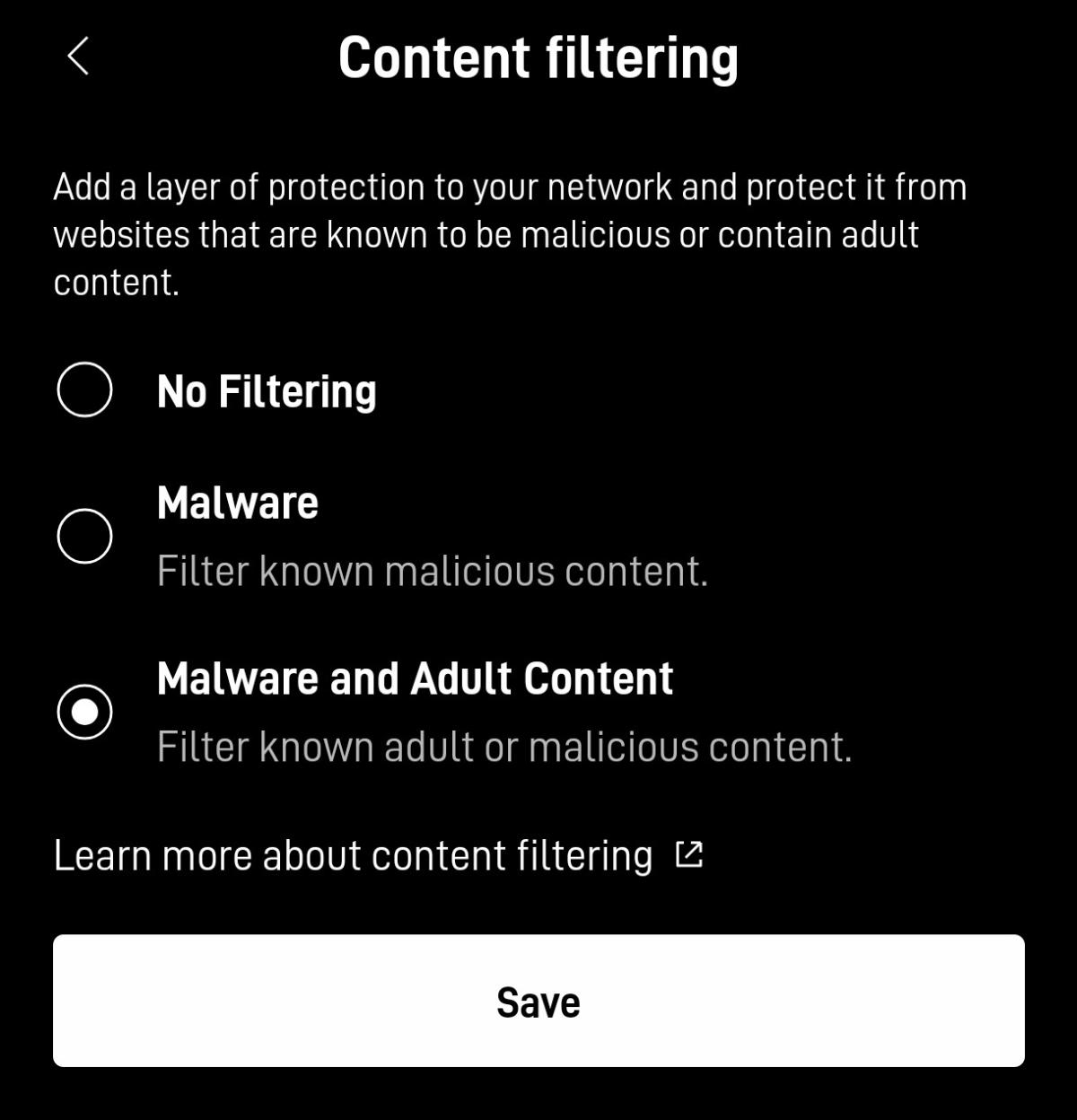
From that moment, Starlink will block most adult websites and known harmful sites on your network.
What Parents Should Know About the Limitations
While Starlink’s content filtering is helpful, it is not perfect. It blocks many adult websites, but it does not replace parental involvement.
Some apps, VPNs or custom DNS settings can bypass network filters. This is why it is recommended that parents combine Starlink filtering with device-level controls, such as parental controls on Android phones, iPhones and Windows laptops.
The feature also applies to all users equally, meaning it cannot be customised per child or per device.
A Small Step That Makes a Big Difference
The goal of blocking adult content is not to spy on children, but to guide them safely through the digital world. As internet access continues to expand in Zimbabwe, tools like Starlink’s content filtering give parents a practical way to set healthy boundaries at home.
For many families, this simple setting could be the difference between uncontrolled access and a safer online environment. In a connected world, digital parenting is no longer optional and thankfully, it is becoming easier to manage.





Commenting is currently turned off.